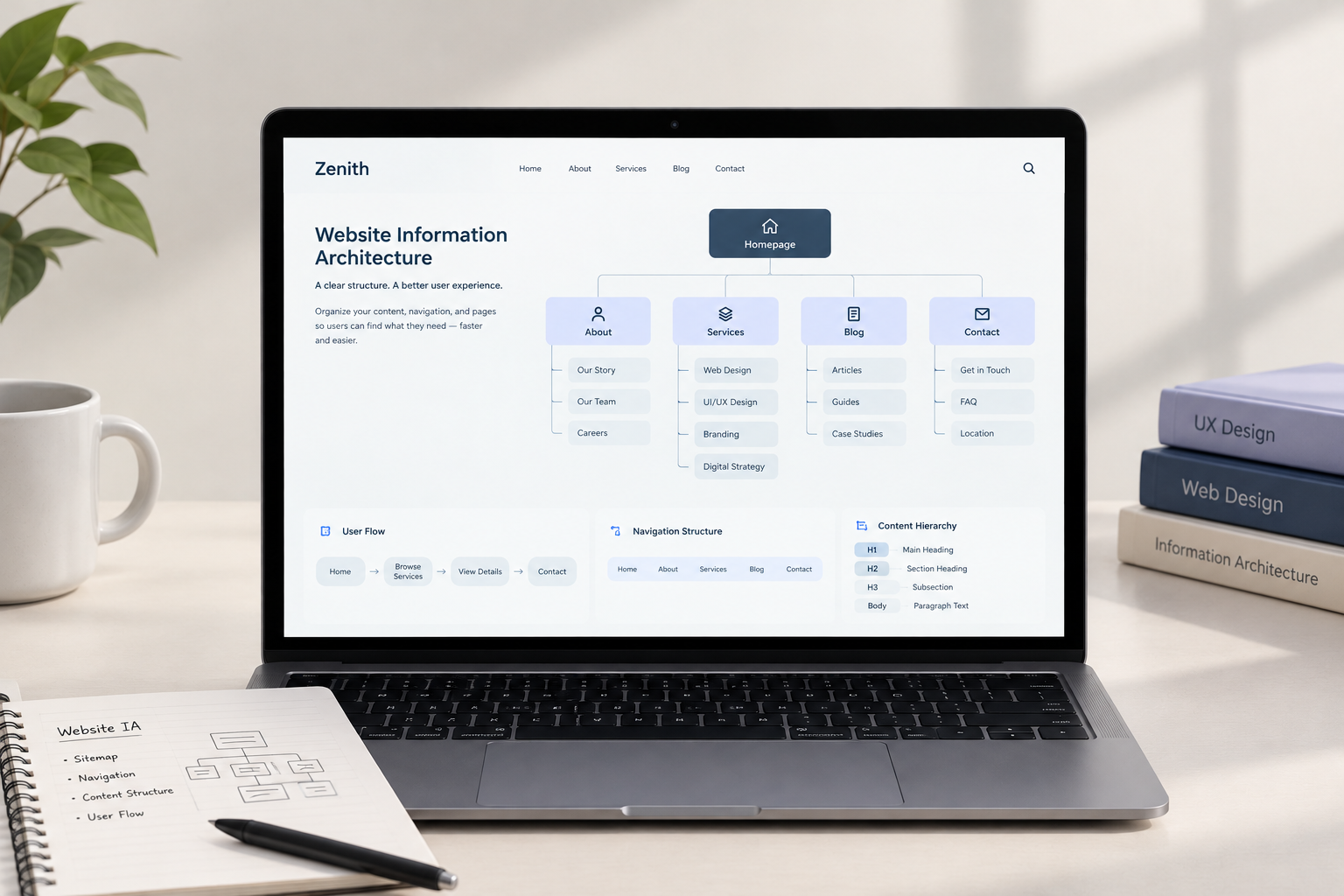
Cluttered menus, buried pages, and broken navigation paths frustrate users, leading to high bounce rates and lost conversions. Implementing a clear website information architecture structures your site’s content logically, making it effortless for visitors to find what they need while helping search engines crawl your pages efficiently.
This guide explores how organizing your content hierarchy transforms user experience, improves accessibility, and boosts your website’s organic visibility.
[Did You Know?] A clear information architecture helps users find important content without relying on excessive navigation or search, reducing cognitive load and friction.
1. What Is Information Architecture in Web Design?
Information architecture in web design refers to the structural blueprint of a website. It involves organizing, labeling, and organizing content so users can navigate intuitively.
A strong structural blueprint connects three core elements:
- Context: Your business goals, budget, technical constraints, and brand identity.
- Content: The text, images, visual assets, and dynamic elements on your site.
- Users: The target audience’s intent, behavioral patterns, and search habits.
2. Core Pillars of Website Structure Design
Designing an intuitive digital workspace requires moving past simple top-level menus. Implementing strategic website structure design principles ensures seamless navigation across desktop and mobile devices.
A Balanced Page Hierarchy Model
- Level 1: Homepage (Root Level)
Acts as the central gateway, introducing your value proposition and primary navigation routes. - Level 2: Main Categories (Parent Pages)
Groups broad topics, services, or product lines into core structural pillars. - Level 3: Subcategories (Child Pages)
Provides specific, focused content related directly to the main category above it. - Level 4: Detailed Items or Posts
Houses standalone articles, individual products, or specific service features.
Hierarchy & Content Grouping
Group related content into logical categories. Keep your site hierarchy flat—aim to keep critical pages within 3 clicks from the homepage to minimize user effort.
Labeling & Nomenclature
Use clear, descriptive labels for menu items rather than creative or ambiguous terms. Users should know exactly where a link leads before clicking it.
3. How Architecture Powers Website Navigation Design
Your visual navigation relies directly on underlying structural decisions. Modern website navigation design translates complex data trees into accessible visual paths.
| Navigation Type | Best Use Case | UX Impact |
| Top Navigation Bar | Core landing pages & primary offerings | High visibility, immediate orientation |
| Mega Menus | Large e-commerce or enterprise platforms | Eliminates sub-menu hunting for deep categories |
| Breadcrumb Trails | Complex blogs, documentation, & catalogs | Shows exact location path, lowering bounce rates |
| Footer Links | Utility pages, privacy policies, & secondary links | Acts as a safety net for lost visitors |
4. Step-by-Step Process to Build an Effective Website Architecture
Developing a scalable structural blueprint involves four practical steps:
- Conduct Content Audits: Inventory every existing page to identify duplicates, thin content, and missing topics.
- Perform Card Sorting: Have real users organize topic cards into groups to understand their natural mental models.
- Map Sitemaps & Wireframes: Draft clear outline diagrams displaying parent-child page relationships before writing code.
- Usability Testing: Run tree-testing tasks to observe whether users can find specific information without getting lost.
Checklist: Information Architecture Optimization
[ ] Maintain a flat site hierarchy (3 clicks max to key pages)
[ ] Align navigation categories with natural user mental models
[ ] Use descriptive, keyword-rich labels for menu items
[ ] Implement clear breadcrumb paths on deep subpages
[ ] Provide a clean XML sitemap for search engine crawlers
[ ] Verify links and mobile menu toggles work seamlessly
Conclusion
A well-structured website information architecture bridges user intent with business success. By pairing logical content grouping with clean navigation design, you eliminate user friction, keep visitors engaged, and establish a clear foundation for SEO growth.